

Processing jobs
Make proxies and other processed versions of a file with the workers your installation runs.
A processing job asks a worker to make something from a file: a 720p proxy of a heavy video, or whatever else the workers on your installation offer (transcripts, scene lists). The result is a version of the file; the original is never changed.
Starting a job
Open the file, open its details (the info button), and choose Process. The menu lists what can be made from this kind of file.

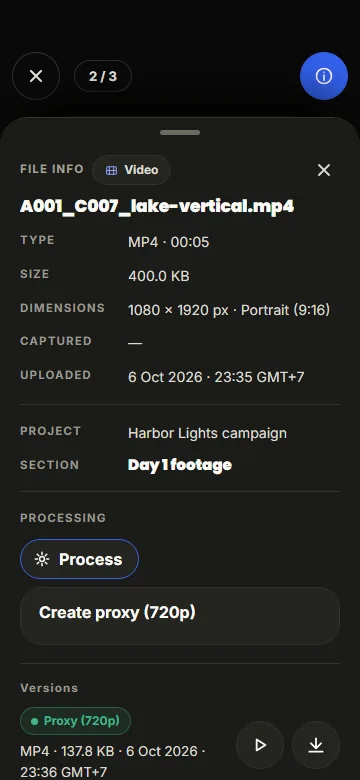
The job then shows its state on the file and in the viewer:
| State | Meaning |
|---|---|
| Waiting for worker | no worker for this kind is running right now; the job starts when one is |
| Queued | a worker will pick it up next |
| Starting | a worker took the job |
| Processing, with a percentage | the worker is on it; the number updates live |
| Ready | the new version is listed under Versions |
| Failed | Show the error tells why; Retry starts it again |
| Cancelled | someone stopped it |
Cancel stops a job that has not finished. Moving the file to the Trash cancels its jobs.
Versions
Finished versions are listed in the file's details with their format and size. Play one in the viewer or download it. Anyone who may download the file may download its versions.
Who can start jobs
Super admins, admins and editors. Which kinds exist depends on the workers your administrator runs: Shotstash includes one that makes 720p video proxies, and anyone can write more.